


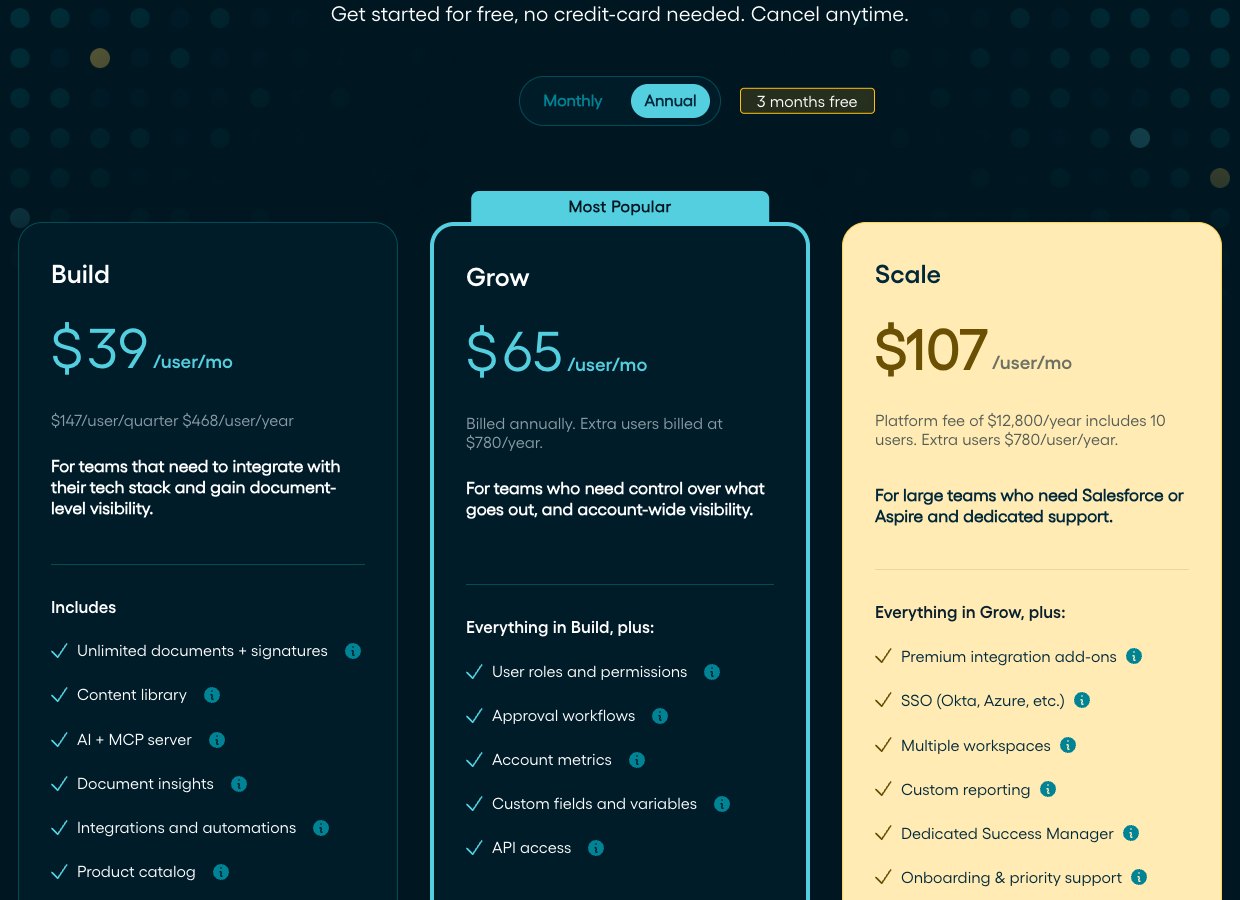
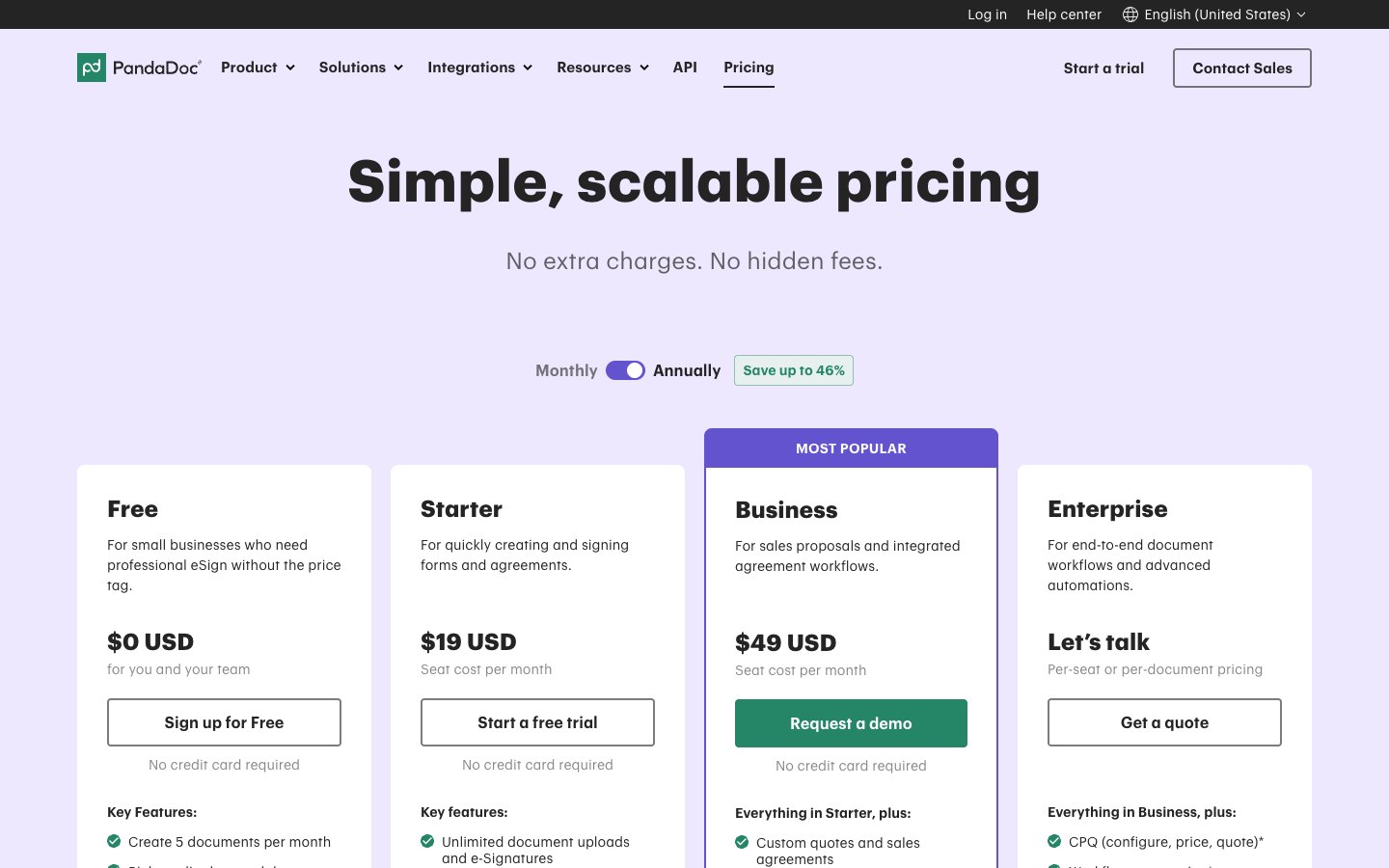
Proposify costs $39 per user per month billed annually for its entry plan, Build, while PandaDoc starts at $19 per seat per month and has a free plan. PandaDoc is the cheaper tool for sending and signing documents. Proposify suits teams that want interactive quotes and design-led proposals and can pay more per seat.
Proposify vs PandaDoc at a glance
Proposify and PandaDoc both build, send, track and e-sign sales documents, and they differ on price, approvals, quoting and free access.
| What you compare | Proposify | PandaDoc |
|---|---|---|
| Entry price, billed annually | $39 per user per month (Build) | $19 per seat per month (Starter) |
| Entry price, billed monthly | $49 per user per month | $35 per seat per month |
| Free plan | No, 14-day trial | Yes, 5 documents per month |
| Approval workflows | From Grow at $65 per user per month | From Business at $49 per seat per month |
| Quoting | Buyers choose optional fees or quantities | Pricing tables and payments from Business |
| Templates | Content library from Build | Up to 5 below Business, then unlimited |
| Salesforce | Paid premium add-on | Paid add-on |
| Security | SOC 2 Type 2 and GDPR | SOC 2 Type 2 and GDPR |
What do Proposify and PandaDoc do?
Proposify and PandaDoc turn a sales document into something a buyer can open, review and sign online. They differ in how far they reach beyond the proposal.
Proposify
Proposify is proposal software for sales teams. You build a proposal in a drag-and-drop editor with text, images, video, tables and shapes, send it to the buyer and see when each recipient opens it and how long they spend in each section. Every plan lists unlimited documents and signatures, so the buyer can accept in the same document.
PandaDoc
PandaDoc is a document workflow platform for proposals, quotes and contracts. It adds e-signatures with signing order and an audit trail on every plan, payment collection on Business and, on Enterprise, workflow automation and smart content. CPQ (configure, price, quote) and notary are paid options on Enterprise.
How much do Proposify and PandaDoc cost?
PandaDoc costs less at both ends of the range: Starter is $19 per seat per month billed annually against $39 for Proposify Build, and PandaDoc Business at $49 is $16 below Proposify Grow at $65. Both vendors price per seat, so the gap grows with every user you add. Our own pages cover each vendor in more detail: see Proposify pricing and PandaDoc pricing.
Proposify plans
Proposify sells Build, Grow and Scale. Build is also available quarterly at $147 per user, which equals $468 per user per year and is marketed as three months free. Some older comparison pages still list Basic, Team and Business plans: those no longer appear on Proposify’s pricing page.
PandaDoc plans
PandaDoc sells Free, Starter, Business and Enterprise. It says annual billing saves up to 46% against paying month to month. Enterprise is priced per seat or per document, with a document-based package that has unlimited seats.
What a team of five pays
The figures below multiply each annual list price by five users, using the per-user-per-month price times 12 months times 5. They show the plan fees only, before the extras listed in the next section.
The cheapest paid setup for five users is PandaDoc Starter at $1,140 per year. The cheapest setup with approval workflows is PandaDoc Business at $2,940, which is $960 less than Proposify Grow, the first Proposify plan with approvals. Proposify Scale is a flat $12,800 per year and includes 10 users, so it only pays off for larger teams. Proposify’s own blog describes Grow as $325 per month for five seats, which matches $65 per seat, and its pricing page bills extra users at $780 per year. Grow and Scale are sold through a demo, so ask for the seat minimum and a written quote before you budget.
Costs beyond the plan price
Plan fees are not the whole bill on either side.
- Proposify template design: custom template design costs $1,500, and the Launch kit costs $2,000 as a one-time fee for onboarding, custom template design and 30 days of priority support.
- Proposify extra users and integrations: extra users on Scale cost $780 per user per year, and the Salesforce managed package and Aspire need a premium add-on.
- PandaDoc usage credits: documents created through the API, Zapier, Make, forms or bulk send use credits. Starter and Business include trial credits for first-time customers, then you buy a recurring credit pack.
- PandaDoc overage: when credits run out, API document creation pauses. Other automated creation continues and is billed per unit, or up to $5 per document if your order form lists no unit price.
- PandaDoc add-ons on Business: Salesforce, workflow automation tools, team workspaces, SSO, bulk send, web forms and content locking are optional extras.
Which has the better document editor and templates?
Both use drag-and-drop editors, so the deciding difference is the template limit: PandaDoc allows up to 5 templates on Free and Starter and unlimited templates on Business, while Proposify lists a content library of reusable sections from Build.
- Proposify: you drag text, images, video, tables and shapes onto the page, and embed videos from sources such as YouTube. The content library stores case studies, team bios and other sections you pull into new documents. An AI writing widget helps you write, refine and condense text, and Grow adds custom fields and variables.
- PandaDoc: the rich media editor supports embedded videos and themes. Starter adds editing in Microsoft Word, Business adds custom branding and a content library, and Enterprise adds smart content.
Which handles quotes, pricing tables and payments better?
Proposify lets buyers choose optional fees or add their own quantity inside the proposal, while PandaDoc lets sellers build pricing tables and collect payments from the Business plan.
- Proposify: interactive quoting turns optional line items into passive upsells, and a product catalog on Build stores prices in one library so reps pull services into a quote. Payments run through Stripe and invoicing integrations such as FreshBooks.
- PandaDoc: Business includes custom quotes, pricing tables, a product catalog and payment collection. Authorize.Net is one of the listed payment integrations. CPQ is an optional paid add-on on Enterprise.
How do approvals, collaboration and tracking compare?
Approval workflows cost less on PandaDoc: they start on Business at $49 per seat per month, while Proposify starts them on Grow at $65 per user per month.
- Proposify approvals: you set conditions that require a role to approve before a document goes to the buyer. Conditions include price total, discount percentage and line item discount percentage. Build, Grow and Scale include 1, 3 and 5 collaborators, who can edit or approve but not create or send.
- Proposify tracking: document analytics show a timeline of each recipient’s opens and the time spent in each section. Grow adds account metrics such as time to first view and time to close, and Scale adds custom reporting with a full CSV export.
- PandaDoc collaboration: inline comments come on every plan, suggested edits and approval workflows start on Business, and Business includes up to 3 deal rooms.
- PandaDoc tracking: real-time notifications and the audit trail are on every plan. Business adds recipient analytics, automatic reminders and automated reports.
How do integrations and AI features compare?
Both tools connect to the major CRMs, and both charge extra for Salesforce.
- Proposify integrations: the integrations page lists HubSpot, Microsoft Dynamics, ActiveCampaign, Close, Copper, Dropbox, Google Drive and FreshBooks. A workflow automation builder creates Zapier-style rules, and API access starts on Grow.
- PandaDoc integrations: PandaDoc names HubSpot, Salesforce and Pipedrive as embedded CRM integrations. CRM integrations start on Business, and the API on Starter needs usage credits.
- AI in Proposify: an embedded AI widget writes, refines and condenses text, and an MCP server connects Proposify to Claude to create and update documents from Build.
- AI in PandaDoc: an AI assistant is in the editor from Starter. A Claude connector and a ChatGPT app are in beta on all plans, and PandaDoc says it may introduce usage limits later.
How do security and compliance compare?
Both vendors state SOC 2 Type 2 and GDPR compliance, so the difference lies in the extras each one lists.
- Proposify: it states a SOC 2 Type 2 audit against the AICPA Trust Services Criteria for security, availability and confidentiality. Stripe processes payments at PCI Service Provider Level 1, and SSO with Okta or Azure comes with Scale.
- PandaDoc: SOC 2 Type 2, GDPR, eIDAS and the US ESIGN Act are listed on every plan. Business adds passcode and SMS verification and KBA with ID verification, Qualified Electronic Signatures need an annual plan, and Enterprise adds data residency in the US or EU. HIPAA compliance is an optional Enterprise add-on.
Do Proposify and PandaDoc have a free plan?
PandaDoc has a Free plan that lets you create 5 documents per month, and Proposify has a 14-day trial with no card instead.
- PandaDoc: Free costs $0, Starter has a 14-day free trial without a credit card, and Business is sold through a demo request.
- Proposify: the Build plan has a 14-day trial with no card needed, and Grow and Scale are sold through a demo. The pricing page lists no permanent free plan.
Who should choose Proposify and who should choose PandaDoc?
PandaDoc fits teams that want a lower price per seat, a free plan or payments built in. Proposify fits teams that sell on design and let buyers shape the quote.
When is plain e-signature software enough?
Plain e-signature software is enough if you write contracts in Word or Google Docs and only need them signed, because a signing-only tool covers the job and costs less than either proposal platform. Signaturely, our own product, sends documents for e-signature with templates, reminders and an audit log. Personal costs $25 per month or $240 per year for 5 signature requests per month and 1 template. Business costs $50 per user per month or $480 per user per year for unlimited requests and templates. A free account sends 1 document per month after the 7-day trial.
Signaturely does not build proposals, quotes or pricing tables, so it replaces only the signing step. For other options see Proposify alternatives and PandaDoc alternatives.
Frequently asked questions
PandaDoc is better for teams that want a lower price per seat, a free plan and built-in payments. Proposify is better for teams that want interactive quotes and design-led proposals and can pay $39 or more per user per month.
PandaDoc Starter costs $19 per seat per month billed annually or $35 billed monthly. Business costs $49 billed annually or $65 billed monthly. Free is $0 and Enterprise is priced by quote.
Proposify is proposal software that lets sales teams build, send, track and e-sign proposals and quotes. Its plans are Build, Grow and Scale, starting at $39 per user per month billed annually.
PandaDoc, Qwilr, Better Proposals and Signaturely are common alternatives. Our Proposify alternatives guide compares them with current prices.
Proposify and PandaDoc both include e-signatures. Proposify lists unlimited documents and signatures from Build, and PandaDoc includes legally binding e-signatures on every plan, with unlimited documents on paid plans.
PandaDoc and DocuSign solve different jobs. PandaDoc builds proposals and quotes with signing included, while DocuSign is built around sending agreements for signature. Our PandaDoc vs DocuSign comparison covers prices and features.