


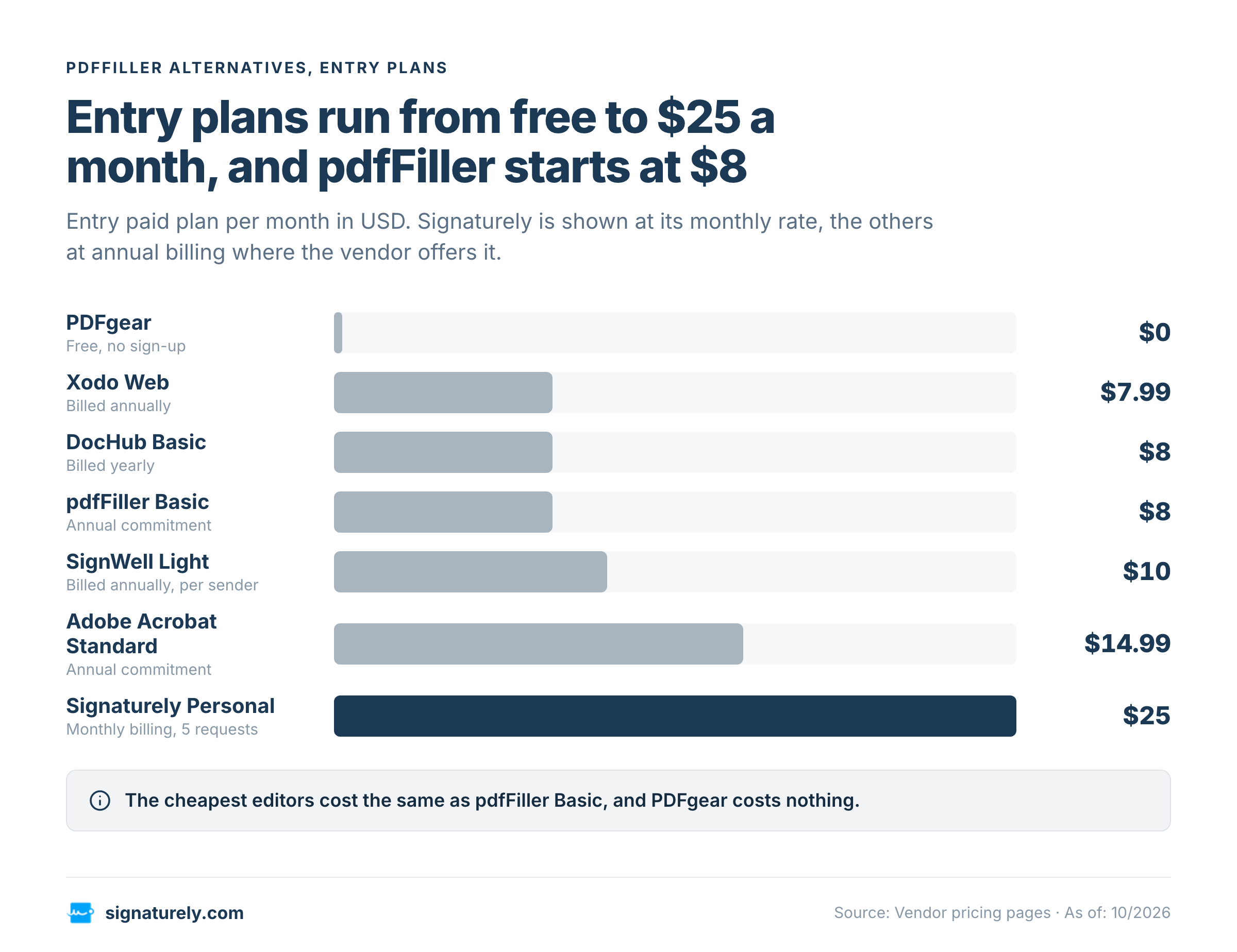
The best pdfFiller alternatives are Adobe Acrobat for full PDF editing with signing, Xodo for low cost editing on web and desktop, DocHub for browser editing with a free plan, PDFgear for a free editor, SignWell for low cost signing and Signaturely for sending documents to be signed. pdfFiller starts at $8 per month on annual billing and has no permanent free plan, while the entry plans below run from $0 to $15 per month. We publish this site and make Signaturely, so weigh that when you read the picks. Prices are USD list prices from each vendor’s own pages in October 2026, and where a vendor shows no USD figure, the article leaves the amount out.
pdfFiller is an online PDF editor that also fills forms and, on its top plan, sends documents out for signing. People look for alternatives for three reasons: the missing free plan, the jump from $8 to $15 for e-signatures and the fact that many only need one of the three jobs it bundles.
What are the best pdfFiller alternatives?
Four of the tools below are PDF editors that change a file and replace the editing and form filling in pdfFiller, while two are signing tools that collect signatures and replace its signing part. The table sorts seven tools, pdfFiller included, by what each vendor publishes. Where a cell says none, the vendor gives no paid plan and we don’t estimate one.
| Tool | Entry paid plan (USD) | Free plan or trial | PDF editing | E-signature |
|---|---|---|---|---|
| pdfFiller | $8 per month, billed annually (Basic) | 30-day free trial, no permanent free plan | Edit, erase and rewrite text | Sending for signature on Premium, through signNow |
| Adobe Acrobat | $14.99 per month with an annual commitment (Standard) | No free plan, free trial of Acrobat Pro | Edit text and images | Sign and request signatures on every plan |
| Xodo | $7.99 per month, billed annually (Xodo Web) | 1 free action per day, 3-day free trial | Edit PDF and DOCX files | Sign PDF tool |
| DocHub | $8 per month, billed yearly (Basic) | Free plan with 3 uses per month | Add text, whiteout, highlight | Self sign on Basic, send for signature on Pro |
| PDFgear | None, the apps are free | Free, no sign-up | Edit text, images, shapes, links and form fields | Sign tool, plus eSignGear for sending |
| SignWell | $10 per sender per month, billed annually (Light) | Free plan with 3 documents per month | No text editing listed | Core product |
| Signaturely | $25 monthly or $240 yearly (Personal) | Free account after the trial, 1 document per month | No text editing | Core product |
What does pdfFiller cost and what does it include?
pdfFiller Basic, Plus and Premium cost $8, $12 and $15 per month on an annual commitment, and month-to-month billing costs $20, $30 and $40. pdfFiller has no permanent free plan. It offers a free trial, and eligible users currently get 30 days, although the trial length, renewal date and payment requirement depend on the offer shown at sign-up.
| Plan | Annual commitment (per month) | Month-to-month | What it adds |
|---|---|---|---|
| Basic | $8 | $20 | Edit, fill, draw, print, save and fax, erase and rewrite text, merge and rearrange pages, convert PDFs to Word |
| Plus | $12 | $30 | Reusable templates, basic fillable fields, version restore, document tags and folders, password protection |
| Premium | $15 | $40 | E-signature through signNow, a library of over 85,000 state-specific US legal forms, web forms, custom branding, user permissions |
Basic covers editing and form filling, which is what most people search for. Sending documents out for signing needs Premium, because pdfFiller hands those requests to signNow and includes a signNow Premium plan in that price. Our pdfFiller pricing breakdown walks through the plans in more detail.
Which pdfFiller alternative fits which job?
Every entry gives the job first, then the price, what the plan includes and where it falls short. Prices are USD list prices from the vendor pages unless the entry says otherwise.
Adobe Acrobat: full PDF editing with signing on every plan
Adobe Acrobat fits people who edit PDFs every day and want editing, conversion, forms and signing from one vendor. Acrobat Standard costs $14.99 per month with an annual commitment and $24.99 on a monthly plan, and Acrobat Pro costs $19.99 on the annual commitment. Both plans edit text and images, convert files to Word, Excel and PowerPoint, build and fill forms and let you sign documents, request signatures and track responses. Pro adds comparing versions of a PDF, and the Acrobat Studio plan at $24.99 per month adds an AI assistant.
There is no free plan, only a free trial of Acrobat Pro and the free Acrobat Reader for viewing. The annual plan billed monthly also carries a fee of half your remaining annual commitment if you cancel after 14 days. Our guides on Adobe Sign alternatives and signing a PDF without Adobe cover the signing side.
Xodo: low cost editing on web and desktop
Xodo fits people who want a full editor for less than Acrobat. Xodo Web costs $7.99 per month billed annually and gives access to more than 40 online tools, including editing, compressing, annotating and redacting PDFs, OCR, comparing two PDFs, editing DOCX files without Word and password protection. Xodo Desktop, built on PDF Studio, costs $9.99 per month billed annually, works offline and offers a perpetual license, and the Xodo Document Suite at $14.99 per month covers web, desktop and mobile.
The free tier allows one action per day, and a 3-day free trial needs a payment method. Xodo’s PDF tools have a signing tool for your own signature, while sending a document to someone else to sign belongs to a separate product, Xodo Sign, which our Xodo Sign pricing guide covers.
DocHub: browser editing with a free plan
DocHub fits individuals and small teams who edit and sign in the browser and want to start free. The free plan allows 3 uses of core features per month, basic PDF tools, an AI assistant, mobile apps, 3 folders and 2 collaborators, and it can’t send a document for signature. Basic costs $8 per month billed yearly and adds unlimited PDF downloads, unlimited self signing, unlimited templates and advanced tools such as whiteout and attaching files.
Sending documents to other people for signature starts on Pro at $12 per month billed yearly, which adds unlimited sign requests, bulk send and in-person signing. That makes DocHub close to pdfFiller Basic on price, with a free plan pdfFiller lacks. Our DocHub alternatives guide covers where it falls short.
PDFgear: a free PDF editor
PDFgear fits people who edit, convert and sign their own PDFs and don’t want to pay. PDFgear states that it is completely free and works without signing up, with apps for Windows, Mac, iPhone, iPad and Android plus free online tools. It edits text, images, shapes, links and form fields, annotates, converts between PDF, Word, TXT, JPG, Excel and PowerPoint with batch conversion and runs OCR in more than 30 languages.
PDFgear has no published paid plan to compare, which makes it hard to judge long term costs. For sending documents to others to sign, it points to a separate platform, eSignGear, whose terms you should check before relying on it. A free editor also won’t match pdfFiller’s template library or team features.
SignWell: low cost signing with a free plan
SignWell fits teams whose main job is collecting signatures rather than editing PDFs. The free plan allows 1 sender, 1 template and 3 documents per month with an audit trail and API access. Light costs $10 per month billed annually or $12 monthly for 1 sender, with 5 templates per sender and unlimited documents, and each extra sender adds $10 per month on annual billing.
SignWell lists no PDF text editing among its features. It places signature and data fields on a document and sends it, so pair it with a free editor such as PDFgear if the file needs changes first. Our SignWell pricing guide covers the higher plans.
Signaturely: the signing step for small teams
We make Signaturely, so treat this entry with that in mind. Signaturely fits small teams that need to send contracts and forms for signature and don’t need an editor. Personal costs $25 per month or $240 per year and includes 5 signature requests per month, 1 template, reminders, an audit log and Google Drive, Dropbox, OneDrive and Box integrations. Business costs $50 per user per month or $480 per user per year and adds unlimited signature requests and templates, team management and custom branding.
After the free trial, an account stays on a free plan that sends 1 document per month. Signaturely isn’t a PDF text editor, so people who need that should use one of the editors above and send the finished file here. Our guides on filling and signing a PDF and sending a PDF for signature show the steps.
How do you choose a pdfFiller alternative?
Match the tool to the job you do most, since one tool seldom covers editing, form filling and signing for less money than pdfFiller.
- **Editing the text of a PDF:** Adobe Acrobat for the full toolset, Xodo for a lower price, PDFgear if you want it free.
- **Filling a form and adding your own signature:** PDFgear is free, DocHub’s free plan covers 3 uses per month and Xodo has a signing tool.
- **Collecting signatures from other people:** SignWell and Signaturely are built for it, DocHub needs the Pro plan and Adobe Acrobat includes it.
- **Keeping everything in one account:** pdfFiller Premium bundles editing, forms and signing through signNow at $15 per month on annual billing.
You can collect signatures without editing PDF text, because a signing tool places fields on top of the document and leaves the content as uploaded, so correct typos before you upload. Count the people who need each job before you compare prices. A signing plan is priced per sender or per user, and an editor is usually priced per person, so a team with one editor and five senders pays differently from a team where everyone edits.
When is pdfFiller still the right choice?
pdfFiller stays a sensible pick when one account has to cover editing, reusable templates, web forms and signing, because replacing it with two or three tools adds logins and billing. It also fits teams that use the legal form library on the Premium plan, which lists over 85,000 state-specific forms.
The alternatives win when you use only one part. A person who edits two PDFs a month gains little from a $15 plan, and a team that only sends contracts for signature pays for an editor it never opens. Price each job separately, then compare the total with pdfFiller’s $8, $12 or $15 per month.
Frequently asked questions
pdfFiller offers a free trial instead of a permanent free plan, and eligible users currently get 30 days. After the trial you need a paid plan to keep editing, so check the payment and renewal terms shown at sign-up before you start.
PDFgear is free with no sign-up for editing, converting and signing your own PDFs, and DocHub’s free plan allows 3 uses per month. For sending documents to others to sign, SignWell’s free plan covers 3 documents per month.
Open the PDF in an editor that supports form fields, type into the fields, add your signature and save the file. PDFgear, DocHub, Xodo and Adobe Acrobat all do this, and our guide to filling and signing a PDF shows the steps.
Xodo costs $7.99 per month on annual billing against $14.99 for Acrobat Standard, DocHub Basic costs $8 per month billed yearly and PDFgear is free. None of them match every Acrobat feature, so compare the tools you use daily before switching.
Upload the PDF to a signing tool such as SignWell or Signaturely, place a signature field for each signer, enter their email addresses and send it. Each signer then opens the link and signs, and the finished file comes back with an audit trail.
Sending documents for signature is part of the Premium plan, which costs $15 per month on annual billing and routes requests through signNow. The Basic and Plus plans don’t list it.