


DocuSign lists public e-signature prices from $10 a month, while OneSpan Sign sells one Enterprise plan with volume-based pricing and no public price. Pick DocuSign for self-serve plans and 1,000+ integrations. Pick OneSpan Sign for regulated customer agreements that need white labeling, built-in ID verification and an API. If you only need signatures and templates, Signaturely is a cheaper third option.
DocuSign vs OneSpan at a glance
| DocuSign | OneSpan Sign | |
|---|---|---|
| Pricing model | Personal, Standard, Business Pro and Enhanced plans | One Enterprise plan, volume-based |
| Entry price | $10/month billed annually | Contact sales |
| Trial | Free trial of eSignature | Free trial |
| Users | Per user on Standard and Business Pro | Transactions or a usage band |
| Add-on SMS | From $0.36 per delivery | From $0.40 per transaction |
| Add-on ID verification | From $2.40 per attempt | From $2.50 per verification |
| API and white labeling | Branding on Standard, API not listed on the plan page | Both included in the Enterprise plan |
| Best for | Teams that want to buy online | Banks, insurers and other regulated senders |
DocuSign vs OneSpan pricing
DocuSign sells four eSignature tiers and shows the price of three of them on its plan page. On annual billing Personal costs $10 a month ($120 a year) and includes 5 envelopes a month. Standard costs $25 per user a month ($300 a year) and Business Pro costs $40 per user a month ($480 a year). Both team plans allow a total of 100 envelopes per user per year, as listed on the plan page. Enhanced plans are quoted by sales and add custom envelope limits, single sign-on and 24/7 live support.
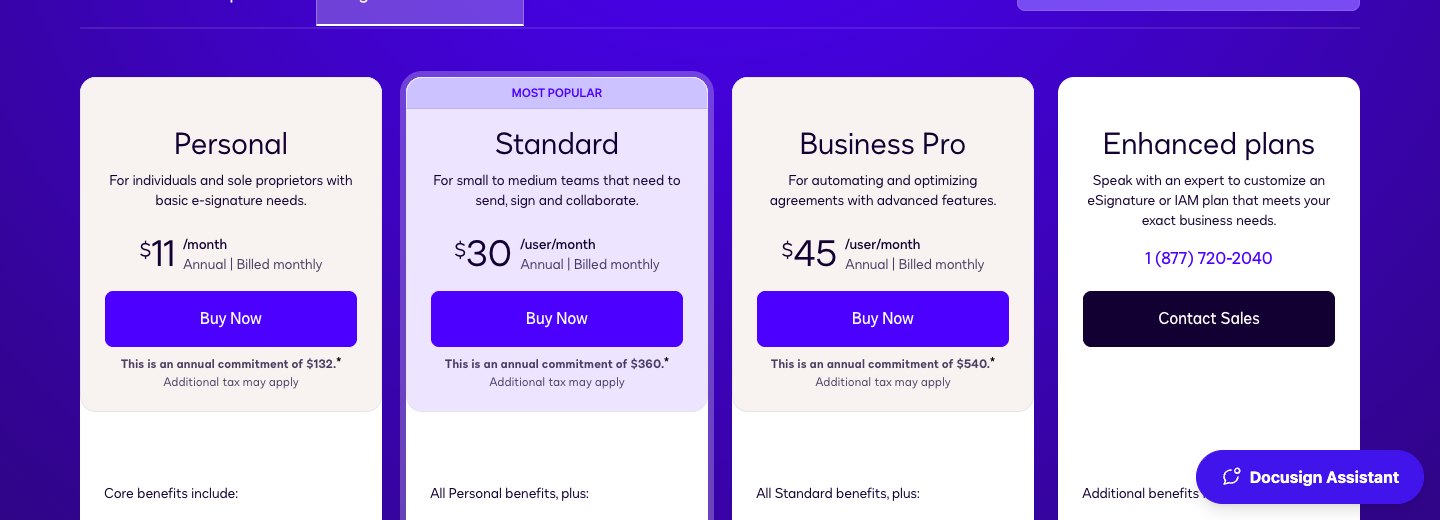
DocuSign also lets you pay a yearly commitment in monthly installments. That option raises the monthly figures to $11 for Personal, $30 for Standard and $45 for Business Pro, as the screenshot above shows.
OneSpan Sign works the other way round. Its eSignature plan page lists a single Enterprise plan with volume-based pricing, and the only action is Contact us. You choose a number of transactions or a usage band that matches your volume, and the price follows from that quote. The plan page names desktop and mobile signing, reusable templates, API access, an embeddable signing UI, white labeling and SSO login as the plan’s feature highlights.
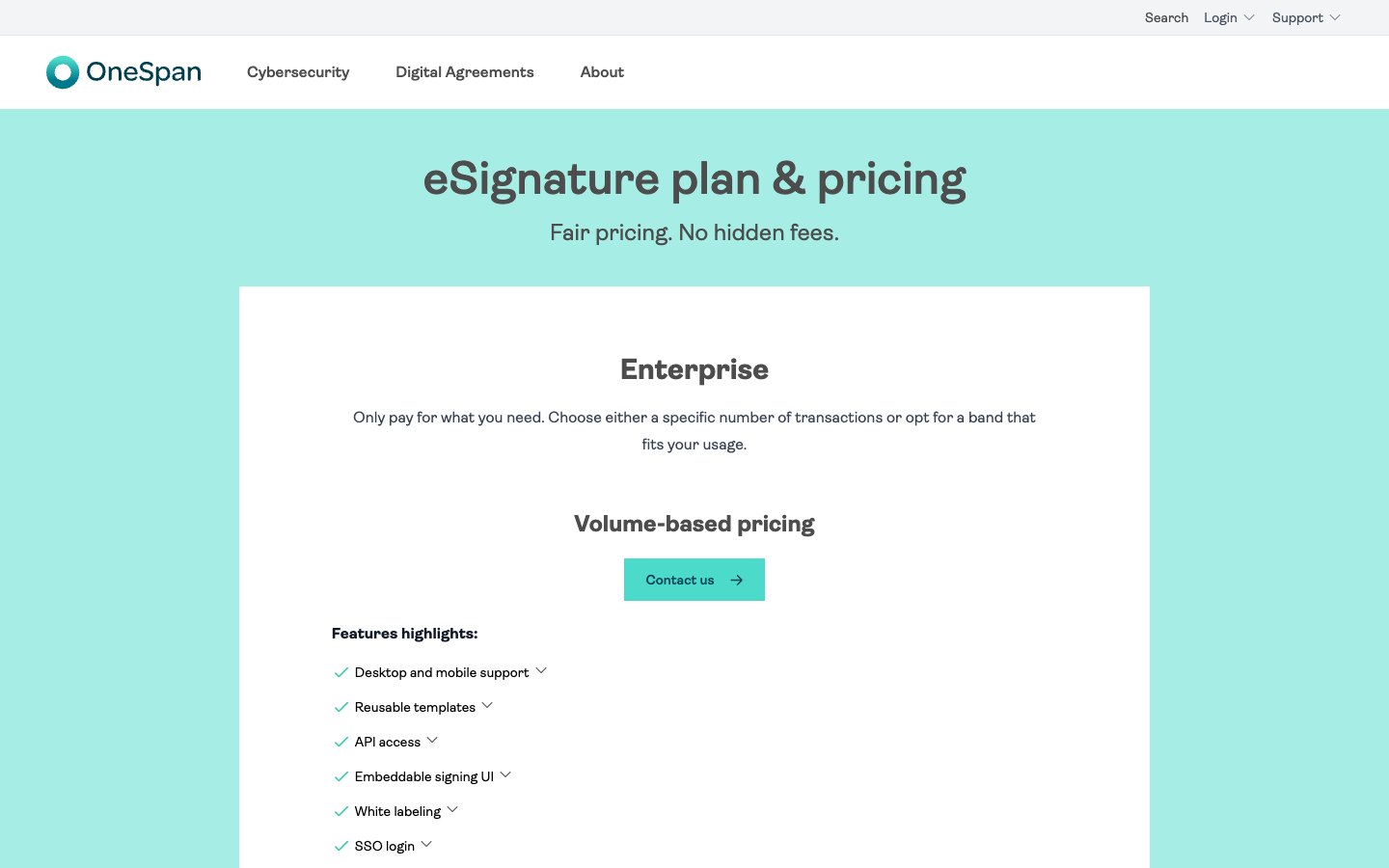
Several third-party comparison sites still quote a OneSpan Professional plan at $22 per user a month. That plan no longer appears on OneSpan’s own plan page, so treat the figure as outdated.
What add-ons cost on each side
Both vendors charge extra for SMS delivery and identity checks, and the units differ, so the numbers do not compare one to one.
OneSpan counts one transaction for all SMS messages sent to all signers of a document. DocuSign counts each delivery. On a document with three signers, DocuSign’s SMS add-on is therefore billed per message, while OneSpan’s is billed once per transaction.
DocuSign vs OneSpan features
DocuSign’s plan page builds around the envelope, one set of documents sent to its recipients. Personal covers 5 envelopes a month. The team plans add shared templates, comments and delegated signing, and Business Pro adds web forms, payment collection and bulk send. DocuSign advertises 1,000+ integrations and a separate Intelligent Agreement Management (IAM) line with unlimited envelopes and code-free workflows.
OneSpan Sign is built around the customer agreement. Its product page describes document preparation, identity assurance, signing and connected workflows as one lifecycle. Features it names include fully white-labeled signing and identity verification, Smart Forms with conditional logic and data prefill, flexible sequential or parallel signer routing, SMS notifications and reminders, and an audit trail sealed into the transaction record. It lists “AI Summary and Q&A” as coming soon.
| Feature | DocuSign | OneSpan Sign |
|---|---|---|
| Reusable templates | Yes, shared on Standard and above | Yes |
| Bulk send | Business Pro and above | Not named on the plan page |
| Payments during signing | Business Pro | Not named on the plan page |
| White labeling | Your own branding from Standard | Fully white-labeled, no OneSpan branding |
| Smart or web forms | Web forms on Business Pro | Smart Forms with conditional logic |
| API | Not listed on the eSignature plan page | REST API plus .NET, Java, Apex, iOS and Android SDKs |
| Embedded signing | Not listed on the eSignature plan page | Embeddable signing UI |
Identity verification and signer authentication
OneSpan puts identity assurance at the center of the product. Its product page lists government ID document verification, biometric face comparison and video liveness detection, with coverage of more than 10,000 identity documents in 193 countries and territories. Signer authentication options include SMS one-time passcodes, Q&A challenge questions, knowledge-based authentication, single sign-on, FIDO passkeys, digital certificates and smart cards.
DocuSign sells identity checks as an add-on for Standard and Business Pro, from $2.40 per attempt, and includes 5 ID verifications and 5 SMS deliveries as a one-time bonus on Standard. For a business that verifies a handful of signers a month, the add-on model keeps the entry cost low. For a lender onboarding customers at volume, OneSpan’s bundled approach is what the vendor designs for.
Security and compliance
OneSpan states that its infrastructure is compliant with SOC 2 Type II, ISO/IEC 27001, ISO/IEC 27017, ISO/IEC 27018 and FedRAMP requirements. Its product FAQ adds HIPAA and GDPR to the list of standards OneSpan Sign meets. OneSpan also supports eIDAS 2.0, KYC and AML compliance programs through the identity events it records in the audit trail, and it offers notary solutions.
DocuSign positions its Enhanced plans for teams that need to “ensure compliance with all security configurations”, along with SSO and centralized organization management. For a deeper look at DocuSign’s own security model, see our guide on whether DocuSign is secure. Both vendors publish their certifications on a trust page, so ask for the current report before you sign a contract.
Integrations and API
DocuSign lists 1,000+ integrations on its plan page, which suits teams that already live in tools such as Salesforce, Google Workspace or Microsoft 365. OneSpan names pre-built and custom integrations for CRM systems such as Salesforce and Microsoft Dynamics 365, HR systems such as Workday and Greenhouse, and Google Workspace and Microsoft 365. Its REST API and SDKs come with the Enterprise plan, which matters for teams embedding signing in their own app.
What to ask each vendor before you buy
Both vendors price by usage, so the quote depends on numbers you can collect in an afternoon.
- Yearly volume: count the documents your team sends in a year. DocuSign’s team plans list a total of 100 envelopes per user per year, and OneSpan quotes by number of transactions or a usage band.
- Signer checks: decide how many signers need SMS codes or ID verification. Both vendors bill these as add-ons, from $0.36 to $0.40 per SMS and from $2.40 to $2.50 per ID check.
- Billing basis: DocuSign’s annual commitment billed monthly costs $1 to $5 more per plan each month than annual billing, so confirm which basis the quote uses.
- Branding and API: list whether signers must never see a vendor logo and whether signing runs inside your own app. OneSpan names white labeling and an API on its Enterprise plan, while DocuSign’s plan page lists branding from Standard.
- Proof for audits: request the current certification reports from each vendor’s trust page before legal review.
Which one should you choose
A third option if you only need signatures
Neither vendor is built for a five-person team that sends a few contracts a month. Signaturely gives you a free plan of 1 document a month after a 7-day trial. Personal costs $25 a month or $240 a year (5 signature requests a month, 1 template) and Business costs $50 per user a month or $480 per user a year, with unlimited requests and templates, team management and custom branding. Every plan includes an audit log, reminders and Google Drive, Dropbox, OneDrive and Box integrations.
Compare the direct matchups in our DocuSign pricing guide, the Signaturely vs DocuSign comparison and the Adobe Sign alternatives roundup, which includes OneSpan Sign.
Frequently asked questions
OneSpan does not publish a plan price, so a direct comparison is not possible. DocuSign lists $10, $25 and $40 a month on annual billing. Ask OneSpan for a quote based on your yearly transaction volume.
OneSpan Sign offers a free trial, linked from its product page. DocuSign also offers a free trial of eSignature.
DocuSign sells self-serve plans by user and envelope allowance. OneSpan Sign sells one Enterprise plan by transaction volume, with white labeling, identity verification and an API at the core.
OneSpan builds its product page around financial services, insurance and government use cases, with identity verification and signer authentication in the workflow. DocuSign’s Enhanced plans list SSO, centralized organization management and security configurations, so compare both quotes against your compliance checklist.
Standard costs $25 per user a month and Business Pro costs $40 per user a month on annual billing. The same plans cost $30 and $45 when the annual commitment is billed monthly.
Signaturely covers signing, templates, reminders and an audit trail for small teams, with a free plan of 1 document a month and paid plans from $20 a month billed annually.