



A contract format is the structure a written agreement follows: a title, the parties, the terms, the exit rules and the signatures, laid out in numbered sections. No U.S. statute prescribes one layout for private contracts, so the format is a convention that keeps the document clear and easy to enforce.
What is the standard contract format?
The standard contract format has eight parts: title, parties and date, recitals, definitions, the main terms, term and termination, general provisions and the signature block. Contracts differ in length, but most business agreements follow this order because each part sets up the next one.
| Part | What it contains | Why it sits here |
|---|---|---|
| 1. Title | The document name, such as Service Agreement | Tells a reader what the document is before anything else |
| 2. Parties and date | Legal names, addresses and the effective date | Fixes who is bound and from when |
| 3. Recitals | Short background statements, often starting with “Whereas” | Gives context for the deal and is optional |
| 4. Definitions | Meaning of terms used throughout, such as “Services” or “Fees” | Lets later clauses use one term consistently |
| 5. Main terms | Scope of work, payment, deliverables and each party’s duties | The core of the deal |
| 6. Term and termination | Start, end or duration, renewal and how either side can exit | Sets the exit rules before a dispute starts |
| 7. General provisions | Governing law, dispute resolution, confidentiality, assignment and amendments | Standard clauses that apply to every part of the deal |
| 8. Signature block | Names, signatures and dates for every party | Shows each party agreed |
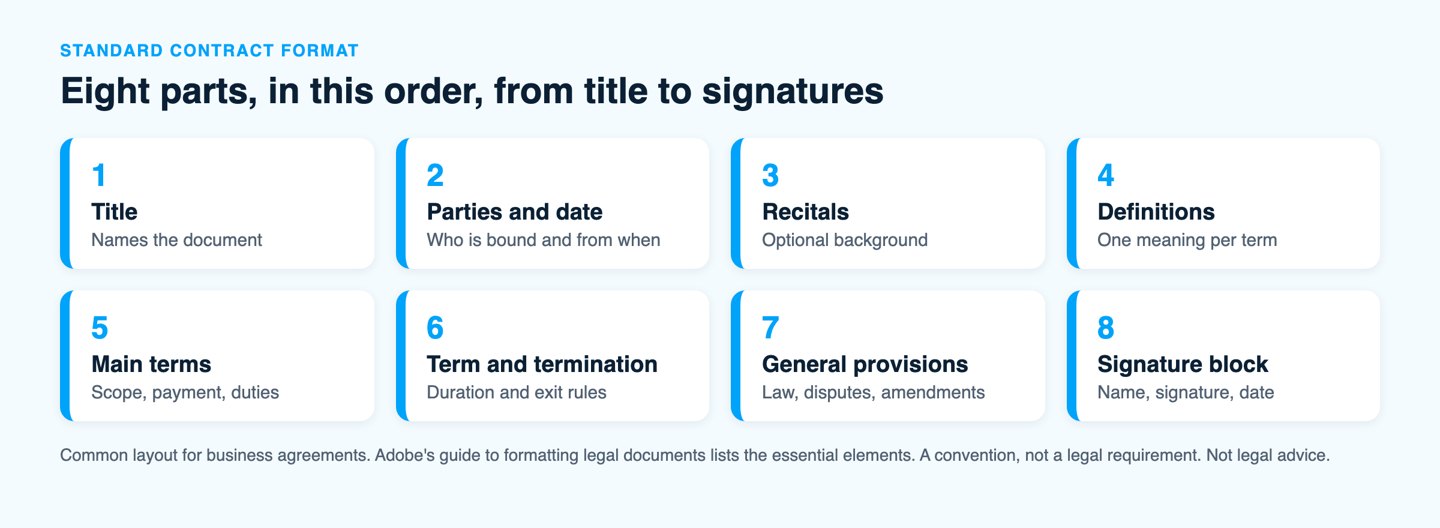
The guides we checked agree on the same essentials. Adobe’s guide to formatting legal documents lists the legal names and contact details of all parties, the rights and obligations of each side, any special clauses, a start date and an end date or duration, and signatures from all parties.
How do you format a contract so it is easy to read?
Format a contract on a standard 8.5 by 11 inch page with 1-inch margins, a 12 pt serif or clean sans-serif font and numbered headings. These are conventions from Adobe’s formatting guide, and they matter because a reader should find any clause in seconds.
- Page and margins: use letter size, or legal size (8.5 by 14 inches) when your industry expects it, with 1-inch margins on all sides for printed copies.
- Font: pick a serif font such as Times New Roman or a clean sans-serif font such as Arial, with body text at 12 pt and footnotes at 10 pt.
- Alignment: align text to the left and keep bold and italics for defined terms and headings only.
- Headers and footers: put the document title and page numbers in the header and an optional date or confidentiality notice in the footer.
- Page numbers: Roman numerals (i, ii, iii) for front pages such as a table of contents and Arabic numerals (1, 2, 3) for the main text.
- Exhibits: label attachments as Exhibit A or Appendix 1 and refer to them by that label in the body.
Long contracts also gain from a table of contents so reviewers can jump to a clause. A short contract of two or three pages does not need one.
How should you number the sections of a contract?
Number sections with a decimal system: 1 for main sections, 1.1 for clauses and 1.1.1 for sub-clauses. Numbering lets you point to an exact clause, such as “Section 4.2”, instead of “the paragraph above”, which removes a common source of disputes.
Keep numbering consistent from start to finish. If you add or remove a clause, check every cross-reference, because a reference to a section that moved is an easy mistake to miss.
What does a contract format example look like?
A contract format example is a skeleton you fill in with the deal details. The outline below fits a simple service agreement and shows the order and numbering of each part.
- Title and date: Service Agreement, effective on the date both parties sign.
- Parties: the full legal name and address of the client and of the service provider.
- Services: a clear description of the work and the deliverables.
- Payment: the fee, the invoicing schedule and the due date.
- Term and termination: the start date, the length and the notice each side must give to end the contract.
- Confidentiality: what stays private and for how long.
- General provisions: governing law, dispute resolution, assignment and amendments.
- Signatures: printed name, signature and date for each party.
You do not need to build this from a blank page. Signaturely has free templates in Word and PDF for a service agreement, an independent contractor agreement, a non-disclosure agreement, a rental agreement and an employment contract.
For the content of each clause, our guide on how to write a contract walks through the steps, and the page on what makes a contract valid covers the legal elements that sit beneath any format.
Does a contract have to follow a specific format to be legal?
No single format is required for most private contracts, because what makes a contract enforceable is its substance: an offer, acceptance, consideration and parties who intend to be bound. A clear layout helps prove those elements, but a plain letter that contains them can still form a contract. Some contract types, such as government contracts, carry their own formal rules, so check them for your case.
The format also does not depend on paper. Under the federal E-SIGN Act, a signature, contract or other record in interstate or foreign commerce may not be denied legal effect, validity or enforceability solely because it is in electronic form. A contract formatted in Word, saved as a PDF and signed electronically follows the same structure as a printed one.
Which format is best: Word, PDF or online?
Use Word while you draft and a PDF or an e-signature platform when you send the contract for signature. Word makes edits and tracked changes easy, and a PDF locks the layout so the signed version looks the same on every device.
- Word (.docx): best for drafting and negotiating because both sides can edit and comment.
- PDF: best for the final version, since the layout, fonts and page breaks stay fixed.
- E-signature platform: best for collecting signatures, because it sends the PDF to each signer, tracks status and stores a record of who signed and when.
Moving from a Word draft to a signed contract takes a few steps in an e-signature tool. Our guide on how to sign a PDF contract shows the process, and the E-SIGN Act guide explains why the result holds up.
What formatting mistakes should you avoid?
The most common formatting mistakes are inconsistent defined terms, broken cross-references, missing party details and a missing signature block. Each one is cheap to avoid and expensive to fix after signing.
- Inconsistent terms: if you define “Client” in Section 1, do not switch to “Customer” in Section 6.
- Broken numbering: after any edit, check that references such as “see Section 4.2” still point to the right clause.
- Missing details: include full legal names, addresses and the effective date, because a missing date or a nickname can cause confusion later.
- No signature block for a party: every party needs a line for name, signature and date.
- Clutter: avoid color, many fonts and heavy bold text, which make a contract harder to read.
What should you use to send and sign your contract?
Use an e-signature tool once the contract is formatted, so each party signs in the right place and you keep a record. Signaturely lets you upload a Word or PDF contract, place signature and date fields and send it to every signer.
Signaturely has a free plan with 1 document a month after the 7-day trial. Personal costs $20 a month billed annually ($25 billed monthly, or $240 a year) for 5 signature requests a month, and Business costs $40 per user a month billed annually ($50 billed monthly, or $480 a year per user) with unlimited signature requests. Both paid plans include an audit log, reminders and integrations with Google Drive, Dropbox, OneDrive and Box.
Frequently asked questions
A contract is formatted as a title, the parties and date, recitals, definitions, the main terms, term and termination, general provisions and a signature block, with numbered sections. The order is a convention and not a legal requirement.
The basic elements are the legal names of all parties, the rights and obligations of each side, any special clauses, a start date, an end date or duration and signatures from all parties. These are the items Adobe lists as essential when you format a legal document.
A common choice is a serif font such as Times New Roman or a clean sans-serif font such as Arial at 12 pt, with 1-inch margins on all sides for printed copies. Footnotes are usually set at 10 pt.
Draft in Word so both sides can edit, then save the final version as a PDF so the layout stays fixed when you send it for signature.
A contract does not need numbered sections to be valid, but numbering is the standard way to make clauses easy to find and reference. A decimal system such as 1, 1.1 and 1.1.1 keeps cross-references exact.
A signature block gives each party a line for a printed name, a signature and a date. When a person signs for a company, add the signer’s title so the document shows who the company is bound by.
A contract can be signed electronically. The E-SIGN Act says a signature or contract may not be denied legal effect solely because it is in electronic form, so an e-signed PDF follows the same format as a printed contract.