



pdfFiller costs $8 per month for Basic, $12 for Plus and $15 for Premium when billed annually, or $20, $30 and $40 when billed month to month. There is no permanent free plan, only a 30-day trial offered at signup. Teams of 10 or more buy the separate Premium for Enterprise plan through sales. This guide covers what each plan includes, what annual billing saves, what a team pays and how pdfFiller compares with Signaturely, with prices checked in November 2026.
What is pdfFiller?
pdfFiller is an online PDF editor from airSlate that lets you edit, fill, convert, store and sign PDF documents in the cloud. It is part of the airSlate Business Cloud, and pdfFiller advertises a library of more than 25 million fillable documents. You can send documents for signatures or sign them yourself. Signaturely is a more focused option for teams that mainly need legally binding signatures rather than a full PDF editor.
pdfFiller Key Features
pdfFiller is built around editing and filling PDFs in one place. You can erase, highlight and rewrite text, merge and rearrange pages, convert PDFs to editable Word files and create fillable forms. The Premium plan adds sending documents out for signature through signNow, which suits teams closing contracts. TechRadar’s review notes that editing existing text works one line at a time, so large rewrites are slower than in a desktop editor.
Key features include:
- Cloud-based PDF editing, filling and page management
- Conversion of PDF files to editable Word documents
- Import from Dropbox, Google Drive, Box and OneDrive
- Password-protected documents and shareable links
- Sending documents for signature through signNow (Premium)
pdfFiller Pricing and Plans (2026)
pdfFiller lists three individual paid plans: Basic, Plus and Premium. Each costs much less when you commit to a year, and the annual commitment is what the headline prices show. The annual total is simply the monthly price times twelve, before applicable taxes. The pricing page also lists two business plans that need a minimum number of users and go through sales.
| Plan | Billed annually | Billed monthly | Annual total | Best for |
|---|---|---|---|---|
| Basic | $8 per month | $20 per month | $96 | Editing, filling and converting PDFs |
| Plus | $12 per month | $30 per month | $144 | Reusable templates, fillable fields and version history |
| Premium | $15 per month | $40 per month | $180 | Sending for signature, branding and legal forms |
Prices checked on pdfFiller’s pricing page in November 2026 and matched against TechRadar’s review, which lists the same $8, $12 and $15 annual and $20, $30 and $40 monthly figures. Prices can change, so confirm on pdfFiller’s site before you buy.
Basic
pdfFiller Basic is designed for individuals who need to edit, fill, save and convert PDFs. It costs $8 per month with an annual commitment ($96 for the year), compared with $20 for a month-to-month subscription. Sending documents out for signature through signNow is part of Premium, not Basic.
Key features of the Basic plan include:
- Editing, filling, drawing, printing, saving and faxing PDFs
- Erasing, highlighting and rewriting text in PDFs
- Merging, rearranging and adding pages
- Converting PDFs to editable Word documents
- Customer support within a day
Plus
The pdfFiller Plus plan adds the tools people need when they work with the same forms again and again. It costs $12 per month billed annually ($144 for the year) or $30 month to month. Plus includes everything in Basic.
Key features of the Plus plan include the ability to:
- Create and reuse document templates
- Add basic fillable fields to PDFs
- Restore previous document versions
- Organize files with smart tags and folders
- Password-protect documents
- Get customer support within 30 minutes
Premium
pdfFiller Premium is listed at $15 per month with an annual commitment ($180 for the year), or $40 on a month-to-month subscription. It includes everything in Plus, plus signNow Premium for sending documents out for signature, the US Legal Forms library, data collection with web forms, custom branding, and user and permission management. pdfFiller says the library holds more than 85,000 state-specific legal forms. The public individual plan listing does not state a user allowance, so check the seats and fees that apply before you commit a team to it.
Key features of the Premium plan include:
- Sending documents and templates for signature with signNow Premium included
- A library of US legal forms
- Web forms for collecting data
- Custom branding for documents
- User and permission management
- Instant chat customer support
Which Features Come With Which pdfFiller Plan?
Every plan covers the core PDF editing tools. Templates, fillable fields, version history and password protection start on Plus. Sending documents for signature, branding, web forms and the legal forms library start on Premium.
| Feature | Basic | Plus | Premium |
|---|---|---|---|
| Edit, fill, draw, print, save or fax | Yes | Yes | Yes |
| Erase, highlight and rewrite PDFs | Yes | Yes | Yes |
| Merge, rearrange or add pages | Yes | Yes | Yes |
| Convert PDFs to editable Word files | Yes | Yes | Yes |
| Reusable templates | No | Yes | Yes |
| Basic fillable fields | No | Yes | Yes |
| Restore previous versions | No | Yes | Yes |
| Smart tags and folders | No | Yes | Yes |
| Password-protected documents | No | Yes | Yes |
| Send for signature with signNow | No | No | Yes |
| US Legal Forms library | No | No | Yes |
| Web forms for data collection | No | No | Yes |
| Custom branding | No | No | Yes |
| User and permission management | No | No | Yes |
| Support response | Within a day | Within 30 minutes | Instant chat |
Source: plan feature lists on pdfFiller’s pricing page, read in November 2026.
How Much Does Annual Billing Save on pdfFiller?
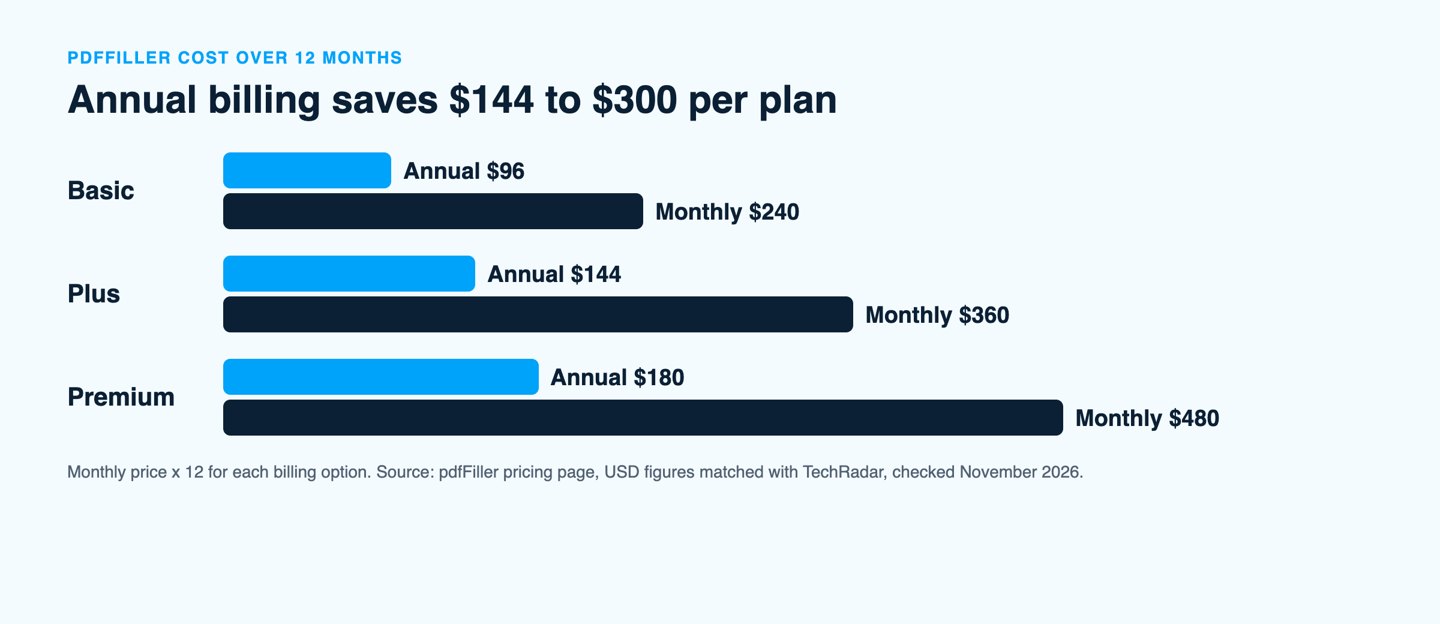
Annual billing is the only way to reach the headline prices. Over twelve months, Basic costs $96 instead of $240, Plus costs $144 instead of $360 and Premium costs $180 instead of $480. pdfFiller labels the annual option 67% off for Basic and Premium and 70% off for Plus, but the published prices work out to 60% and 62.5% less than month-to-month billing.
| Plan | 12 months billed annually | 12 months billed monthly | You save | Saving |
|---|---|---|---|---|
| Basic | $96 | $240 | $144 | 60% |
| Plus | $144 | $360 | $216 | 60% |
| Premium | $180 | $480 | $300 | 62.5% |
Method: monthly price times twelve for each billing option. Saving = month-to-month total minus annual total, divided by the month-to-month total for the percentage.
What Does pdfFiller Cost for a Team?
pdfFiller sells two business plans next to the individual ones. Basic for Enterprise lists $8 per month with a 20-user minimum, and Premium for Enterprise lists $15 per month with a 10-user minimum. Both need an annual commitment and go through sales. Premium for Enterprise adds single sign-on, a 99.9% uptime SLA and Zapier on top of the Premium features, while Basic for Enterprise adds an audit trail, HIPAA compliance and a dedicated customer success manager.
| Option | Listed price | Minimum users | Minimum cost per year |
|---|---|---|---|
| pdfFiller Basic for Enterprise | $8 per month | 20 | $1,920 |
| pdfFiller Premium for Enterprise | $15 per month | 10 | $1,800 |
| Signaturely Business, 10 users for comparison | $40 per user per month billed annually | None listed | $4,800 |
Method: listed monthly price times the minimum number of users times twelve, assuming pdfFiller’s enterprise prices apply per user as the user minimum implies. Enterprise quotes come from sales and can differ. pdfFiller is a PDF editor with signing included, while Signaturely focuses on signatures, so the two prices cover different feature sets.
Does pdfFiller Have a Free Plan or Trial?
pdfFiller does not advertise a permanent free plan. TechRadar reports that every plan starts with a free 30-day trial and that no money is taken during those 30 days, while pdfFiller’s own Premium for Enterprise listing mentions a free 30-day trial for both pdfFiller and signNow. Trial length and renewal terms depend on the offer shown at signup, so note the renewal date before you register.
pdfFiller accepts PayPal, Apple Pay, Google Pay and Mastercard, Visa, American Express and Discover cards. Its pricing page says you can change plans whenever necessary and that full refunds are available within 180 days of cancellation through live chat or [email protected].
pdfFiller Integrations
pdfFiller imports documents from Dropbox, Google Drive, Box and OneDrive, and the Premium for Enterprise plan lists Zapier and custom cloud integrations. It also offers web, desktop and mobile apps, although TechRadar notes that some of them depend on the plan you choose. For PDFs that already need a signature, our guide to PDF signing shows the quickest route.
The Best pdfFiller Alternative: Signaturely
If you mainly need signatures rather than PDF editing, Signaturely is a simpler starting point. It creates legally binding eSignatures on any document, keeps an audit trail for every signature and follows the ESIGN Act in the United States and eIDAS in the European Union. Drag-and-drop fields and templates let new users send a document in minutes, and the finished files stay in the cloud.
pdfFiller’s Premium plan gives you signature requests through signNow and Signaturely gives you its own signing workflow. Signaturely’s free account covers one document per month after the trial, which is enough for occasional signing. For more options, see our comparison of PDF editors that compete with pdfFiller. Give us a try!
Key Features
Signaturely’s most prominent features include the following:
- The ability to create an electronic signature from an image, typed text, or handwritten signature
- The option to either upload a document or use a template
- Collaboration tools for managing the contract life cycle
- Automated reminders to stay on top of active contracts
- Integrations with Google Drive, OneDrive, Box, and Dropbox
Plans & Pricing
Signaturely offers three simple pricing plans:
- Free: one document per month after a 7-day trial, plus cloud storage integrations
- Personal: $20 per month (billed annually) or $25 monthly, with 5 signature requests per month and one template
- Business: $40 per user per month (billed annually) or $50 monthly, including unlimited signature requests and templates, team management, and custom branding
FAQs About pdfFiller Pricing
Below are a few frequently asked questions about pdfFiller pricing.
pdfFiller does not advertise a permanent free plan. TechRadar reports a free 30-day trial on every plan, but trial length and renewal terms can vary by offer, location, and purchase channel. Check the details shown at signup and cancel before the displayed renewal date if you do not want the paid subscription to begin.
If your signup offer includes a free trial, you can use the PDF editing and cloud storage features of the selected plan during the trial. Check the renewal date and payment terms before registering, and download documents you need to keep before paid access ends.
The individual Basic, Plus, and Premium plans are priced per subscription. The Basic for Enterprise and Premium for Enterprise plans list $8 and $15 per month with minimums of 20 and 10 users and an annual commitment, and they are quoted through sales.
pdfFiller’s pricing page says full refunds are available within 180 days of subscription cancellation. You request one through live chat or by emailing [email protected].
pdfFiller accepts PayPal, Apple Pay, Google Pay, and Mastercard, Visa, American Express, and Discover cards. Customers who need more than 100 subscriptions can ask about other payment options.
What You Need to Remember About pdfFiller Pricing
pdfFiller is a practical choice if you need to edit, fill and convert PDFs and want signing included. Basic suits individual editing, Plus suits repeated forms, and Premium suits signing, branding and legal forms, while teams of 10 or more go through Premium for Enterprise. Annual billing cuts the price by 60% or more, so the month-to-month rates only make sense for a short project. If you mainly collect signatures, Signaturely offers a lighter alternative.