


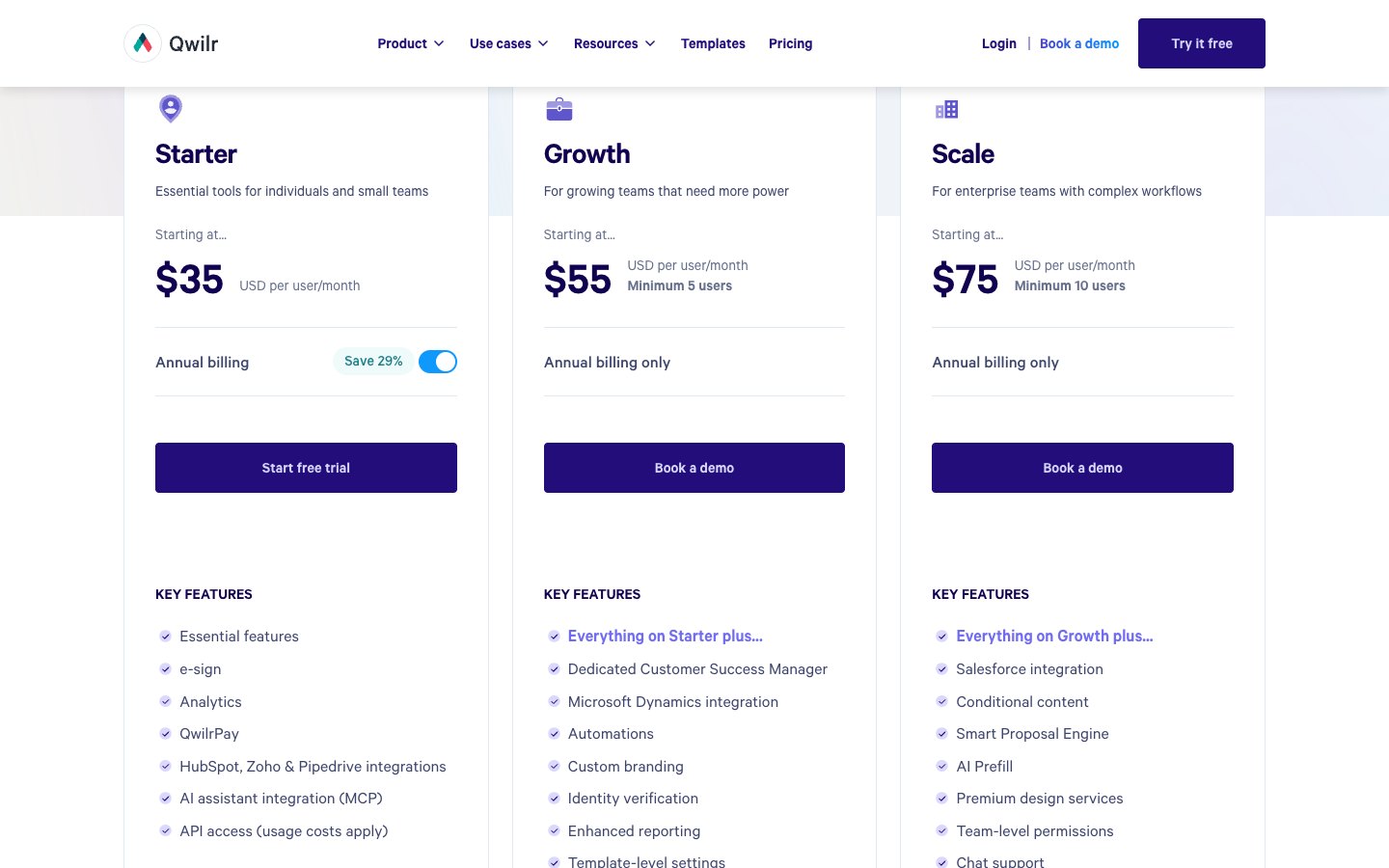
Qwilr costs $35 per user per month on Starter billed annually, $55 on Growth and $75 on Scale, and Starter is also sold monthly at $49. Growth needs at least 5 users and Scale at least 10, so the real starting bills are $3,300 and $9,000 a year. This guide shows what each plan includes, the extra costs on Qwilr’s pricing page and what teams of different sizes pay. It also compares Qwilr with PandaDoc, Proposify, Better Proposals and Signaturely.
How much does Qwilr cost?
Qwilr has three public plans: Starter at $35 per user per month on annual billing, Growth at $55 and Scale at $75. Only Starter can be paid monthly, at $49 per user. Growth and Scale are billed annually and come with a seat minimum. Annual plans are paid upfront for 12 months.
Qwilr’s plan announcement says these three plans replaced the earlier Business and Enterprise plans. Reviews that still quote those two plans are out of date.
What does each Qwilr plan include?
Starter covers e-sign, analytics and QwilrPay for one user, Growth adds a Customer Success Manager, automations and custom branding from 5 users, and Scale adds Salesforce, conditional content and the Smart Proposal Engine from 10 users. All three plans give you unlimited pages.
Starter
Starter is the entry plan for one person or a small team and includes one user. It covers e-sign, page analytics with 60 days of history, QwilrPay and the HubSpot, Zoho and Pipedrive integrations. It also lists an AI assistant integration (MCP) and API access, although the API carries usage costs. Starter comes with a 14-day free trial.
Growth
Growth is for teams that need branding and automation. It includes everything in Starter plus:
- A dedicated Customer Success Manager
- Microsoft Dynamics integration
- Automations and enhanced reporting
- Custom branding and identity verification
- Template-level settings
- 120 days of analytics history
Scale
Scale is for larger teams with complex workflows. It includes everything in Growth plus Salesforce integration, conditional content, the Smart Proposal Engine, AI Prefill, premium design services, team-level permissions, chat support and enhanced API support. Analytics history is unlimited, and the plan renews its document automation credits each year.
What does Qwilr cost beyond the plan price?
Qwilr’s pricing page lists several costs that sit outside the per-user price. The table collects them in one place.
Documents generated through the API or the AI assistant integration use these document credits. The API was a $3,000 a year add-on on the old Enterprise plan, and it is now available on every plan with usage costs. QwilrPay fees come on top of the payment processor’s own fees, which Stripe sets.
Does Qwilr have a free plan or a free trial?
Qwilr doesn’t list a permanent free plan. New accounts get a 14-day free trial of Starter with full access to Starter features, and no credit card is needed. Before the trial ends you can stay on Starter or move to Growth or Scale. If you do nothing, your pages stay live for 30 days but you lose access to the account.
How much will Qwilr cost for your team?
Growth needs 5 users and costs at least $3,300 a year, and Scale needs 10 users and costs at least $9,000 a year, so the seat minimum drives the bill. The table applies the per-user prices to four setups, from one Starter user to a ten-person Scale team.
Every total excludes document credits beyond the free allowance, QwilrPay fees on Starter, onboarding and taxes. A five-person team that only needs Starter features would pay $2,100 a year ($35 x 12 x 5), but it would lack custom branding and automations, which start on Growth.
Who is Qwilr best for?
Qwilr fits sales teams that send interactive web proposals and quotes and want buyers to accept, sign and pay on the same page. Its analytics show how buyers read each page, and the integrations create pages from CRM deals.
It is less efficient for teams that mainly need documents signed. They pay per user for proposal design, and the simpler tools below cost less. Teams that want branding or automation also face a $3,300 minimum on Growth.
What are the best Qwilr alternatives?
The best Qwilr alternatives are PandaDoc, Proposify, Better Proposals and Signaturely. The first three cover the same proposal use case, and Signaturely covers the signing side. The lowest entry prices in the table are Better Proposals at $13 per user per month and Signaturely Personal at $20 per month, while PandaDoc’s Starter at $19 per seat per month undercuts Qwilr’s $35. The table lists each tool’s entry prices on annual billing.
| Tool | Entry price (USD, annual billing) | Free option | Best for |
|---|---|---|---|
| Signaturely | $20 per month on Personal ($240 a year), $40 per user per month on Business ($480 a year) | 7-day trial, then 1 document per month | Sending documents for e-signature with simple pricing |
| PandaDoc | $19 per seat per month on Starter, $49 on Business | Free plan with 5 documents per month | Proposals and document workflows |
| Proposify | $39 per user per month on Build, $65 on Grow, $107 on Scale | 14-day free trial | Proposals with approval workflows |
| Better Proposals | $13 per user per month on Starter, $21 on Premium, $42 on Enterprise | 14-day free trial | Template-based proposals with payments |
Signaturely’s Personal plan includes 5 signature requests a month and 1 template, and its Business plan includes unlimited signature requests and templates, team management and custom branding. For deeper comparisons read our Qwilr alternatives roundup, the Proposify pricing guide and the PandaDoc pricing guide.
What You Need to Remember About Qwilr Pricing
Start the Qwilr trial with Starter if you are a small team, and plan for the seat minimums, document credits and QwilrPay fee before you move up. Growth and Scale only make sense once branding, automation or Salesforce justify the $3,300 or $9,000 floor. If your main goal is getting documents signed, compare Signaturely, PandaDoc and Proposify before you commit.
Frequently asked questions
Qwilr doesn’t list a permanent free plan. Starter offers a 14-day free trial with no credit card.
Starter is $35 per user per month on annual billing or $49 billed monthly. Growth is $55 and Scale is $75, both billed annually.
Starter can be paid monthly at $49 per user. Growth and Scale are billed annually only.
Starter lists e-sign, and Growth and Scale include everything on Starter, so buyers can sign a page without leaving it.
API access is on every plan, and each page generated through it uses a document credit. Extra documents cost $2.50 each, or less in bundles.
QwilrPay charges 0.09% per transaction on Starter and 0% on Growth and Scale. Stripe’s processing fees apply on every plan.
Qwilr’s terms let you cancel after any minimum term with 5 days’ notice before the next payment date on Starter and 30 days’ notice on Growth and Scale. The cancellation takes effect at the end of the billing period and your pages are turned off afterwards. Fees are non-refundable, although Qwilr may give a pro-rata refund on annual plans.
Qwilr says it is SOC 2 Type II certified and GDPR ready, with SAML SSO available. It adds that payments run through Stripe, which makes the payment side PCI DSS compliant.